
It shouldn’t take more than ten seconds to log in. But because there are broken links and codes that won’t come through, and because of sites that just look alike, this isn’t always so easy. Just one wrong touch of a button and you might be filling out your personal information on the wrong website.
With this betting login guide, you can learn how to officially log into your betting site member account in the correct manner. Here you will learn about all the steps to take and how to do it securely.
What do you need before you log in?
Quick Answer: Your username, password, linked phone, and a bookmarked official link.
Before you open the UFABET Login (UFABET เข้าสู่ระบบ) page, take a moment to get three things ready: the username you registered with, your password, and the phone linked to your account in case a verification code is sent. A stable connection helps too, since a dropped signal halfway through can reset the form.
Forgotten any of these? Sort it out first through the official recovery option rather than guessing. On many platforms, several wrong attempts in a row trigger a temporary lock.
How do you log in to official member access step by step?
Quick Answer: Open your official link, check the address, sign in, add the code, confirm.
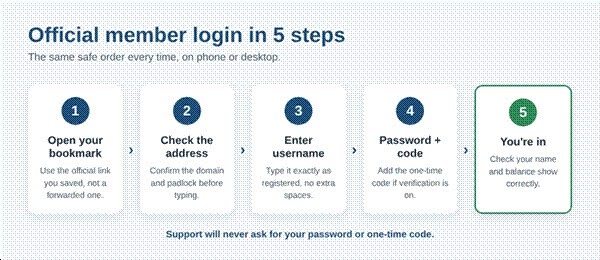
Step 1: Open the official link
Always start from your own bookmark of the UFABET login access point (ทางเข้า UFABET login) published by the brand. Links forwarded in chats or found through ads can lead to copycat pages, a common form of phishing built to collect usernames and passwords.
Step 2: Check the address bar
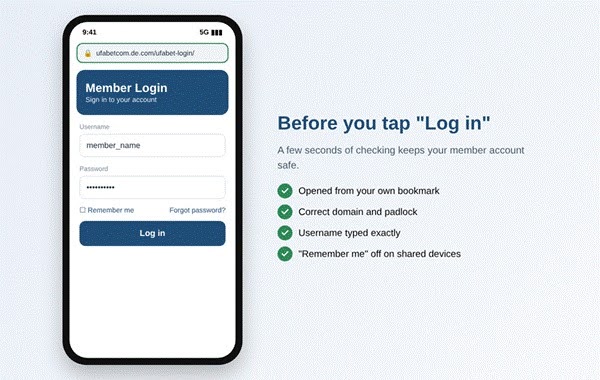
Always check the domain before you type anything into the web browser. The URL should be identical to your bookmark, and the padlock should be visible. Just one letter can make you land on a website that was not supposed to be accessed. If you get a certificate error, do not click; simply close the tab.
Step 3: Type your username and password
Type in your username exactly the way you signed up for the service. Extra spaces at the end of the name or active Caps Lock are the most frequent causes of failure to recognize the right password. The password manager will fill both fields properly.
Step 4: Complete verification
With two-step verification enabled, a one-time code will have to be entered. Ensure this is done within the indicated period of time, as most of these codes expire after a short while. In case there isn’t a code generated, give it a minute and request another one.
Step 5: Verify Sign-In
Upon logging in, ensure that all details such as your member’s name and account information match what you expect. Any discrepancy should be reported to support immediately after logging out of your account.
Your sign-in history can be checked occasionally, if available on the platform, as any suspicious activity can be an indication to change your password and report to support.
What should you do if the login page won’t load or keeps looping?
Quick answer: Clear cache and cookies, try a private window, then switch networks.
A login page that keeps sending you back to the start is usually caused by old data stored in your browser. Clearing it gives the page a fresh start. Forbes has a simple guide on how to clear cache and cookies on iPhone, and Android browsers have the same option under Settings and Privacy.
Still stuck? Open the page in a private window or a different browser, and try switching between Wi-Fi and mobile data. If it won’t open on any device, the platform may be in a short maintenance window, so check the official support channel for updates.
How do you keep your member account secure after logging in?
Quick answer: Unique password, two-step verification, and log out on shared devices.
There are some habits that go a long way. Be sure to use a password you don’t use anywhere else, and if offered, turn on two-step verification. If you are using a shared or public device, don’t check the “Remember me” option, and log out after use.
Do not provide your password or one-time code to anyone, even those claiming to be from support. If it’s a real support team, they will never ask for them. These habits should be formed with each sign-in with UFABET, and signing in will continue to be fast, smooth, and safe every time.
Frequently asked questions
I can’t log in, what’s happening?
Typically it is due to Caps Lock, some old saved password that fills in, or an additional space. Enter it by hand if you are not going to autofill to eliminate the chance of entering the wrong numbers.
Can I log in on my mobile device?
Yes, on a personal device but always log out on shared devices.
If my verification code doesn’t come, what should I do?
Wait a minute, check your signal, then request a new code.
Do not ask for multiple codes; typically only the most recent code will be accepted.
Can you log in using links from group chats?
The bookmark that you create or the official channels of the brand are the safest to enter.
Final thoughts
Official member access is as easy as it is simple: you begin with your own bookmark, you verify the address, you carefully fill in the information and you finish and confirm your membership. If the situation goes wrong, most issues are solved with a fast cache-cleaning or a network switch.
You can comment below or join us on Facebook, X and LinkedIn.
INDIE ACTIVITIES

Indio Downey To Lead Will De Los Santos’ “Love In Vein”
With Chris Hanley Producing And Blue Shark Pictures Financing

DELETE TV Opens Season 13 Submission for Experimental Film & Video Art
International open call welcomes films up to 10 minutes for Austrian broadcast and worldwide livestreaming